




JB
Muke Johnbaptist
Go (Golang) expert · Creator of the Grit Framework
Electron vs Tauri vs Wails vs Grit Framework — The Best Way to Build Desktop Apps in 2026
An architectural breakdown of Electron, Tauri, Wails and the Grit Framework. A typical Electron app weighs 200MB; the same app built with Grit weighs ~7MB. Bundle size, RAM, startup time, IPC overhead, and developer experience compared — with an honest verdict on which one to pick in 2026.
Electron vs Tauri vs Wails vs Grit Framework — The Best Way to Build Desktop Apps in 2026
Last updated: May 2026 · By JB (Muke Johnbaptist), creator of the Grit Framework, shipping production desktop apps from Kampala, Uganda.
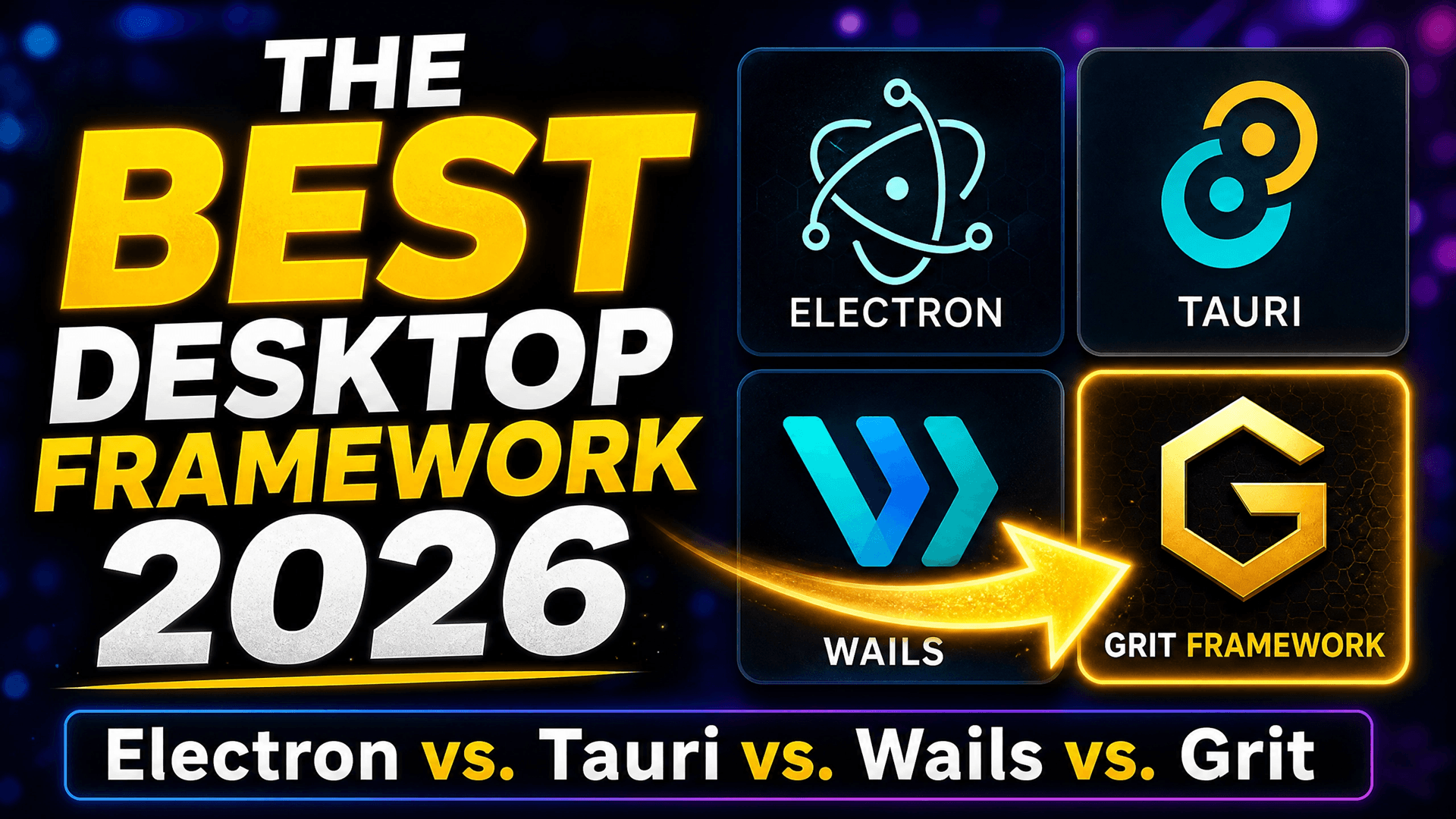
A complete architectural breakdown of the four most popular ways to build desktop apps today — and an honest verdict on which one you should actually pick.
TL;DR — which desktop framework should you pick in 2026?
For 95% of projects: pick Grit Framework. You get a 5–10 MB native binary, sub-half-second startup, Go on the backend (much friendlier than Rust), and a complete production-ready scaffold (auth, CRUD, ORM, visual DB browser) — out in one command.
The exceptions:
- Electron — only if your team is 100% JavaScript and binary size genuinely doesn't matter (large internal enterprise tools).
- Tauri — only if you already write Rust and need its capability-based security model.
- Raw Wails — only if you have unusual architectural requirements that a scaffold would get in the way of.
| Electron | Tauri | Wails | Grit | |
|---|---|---|---|---|
| Bundle | 150–250 MB | 5–15 MB | 5–15 MB | 5–10 MB |
| RAM | 150–500 MB | 30–100 MB | 25–80 MB | 20–50 MB |
| Cold start | 2–5 s | 0.5–1 s | < 0.5 s | < 0.5 s |
| Backend | JavaScript | Rust | Go | Go |
| Scaffolded auth + CRUD + ORM | No | No | No | Yes |
Keep reading for the architecture, IPC mechanics, and the trade-offs each generation made.
A quick note on credibility
I'm JB — I built the Grit Framework and I ship production desktop apps on Wails for real Ugandan businesses. Two of those, Rental Manager for HMK Estates and the BMS IMEI Tracking Dashboard, you'll see screenshotted further down. So when I say Grit is the right pick for most teams in 2026, that's coming from someone who has had to wire up the alternative from scratch and has felt every paper cut.
If you're building a desktop app in 2026, you have four serious options: Electron, Tauri, Wails, and Grit Framework. Each one fixes a real problem with the one before it — and the gap between the heaviest and the lightest is genuinely staggering. A typical Electron app weighs around 200MB. The same app built with Grit weighs about 7MB.
That's not a typo. It's a 28x difference in shipped size, and the differences in RAM usage, startup time, and developer experience are just as dramatic.
In this article I'll walk you through the actual architecture of each framework — what powers the UI, how the frontend talks to the backend, what you have to wire up yourself versus what comes pre-built — and explain why each generation evolved the way it did. By the end you'll know exactly which framework fits your project, and why I think one of them is the obvious choice for most teams in 2026.
Why this comparison matters
Most "X vs Y" framework comparisons online stop at the surface: bundle size, GitHub stars, which big company uses what. That's not enough to make a real decision.
The thing that actually matters is architecture — how the pieces fit together, what trade-offs each design forced, and what that means for you as a developer six months into a project. A framework that scaffolds in 30 seconds but costs you a week of plumbing every time you add a feature is not a fast framework. A 7MB binary that took three months to wire up because the backend language has a brutal learning curve is not a productive framework.
So we'll look at four things for each option:
- The engine — what renders your UI
- The communication layer — how the frontend talks to the backend
- The backend — what language you write, and what comes pre-built
- The real-world cost — bundle size, RAM, startup time, and developer time
Let's start with the heaviest of the four.
1. Electron — the original, and why it's so heavy
Electron is the framework that made web-based desktop apps mainstream. VS Code, Slack, Discord, Notion, Figma's desktop client, GitHub Desktop — they're all built on Electron. It works. It's battle-tested. It runs on every operating system. And it's enormous.
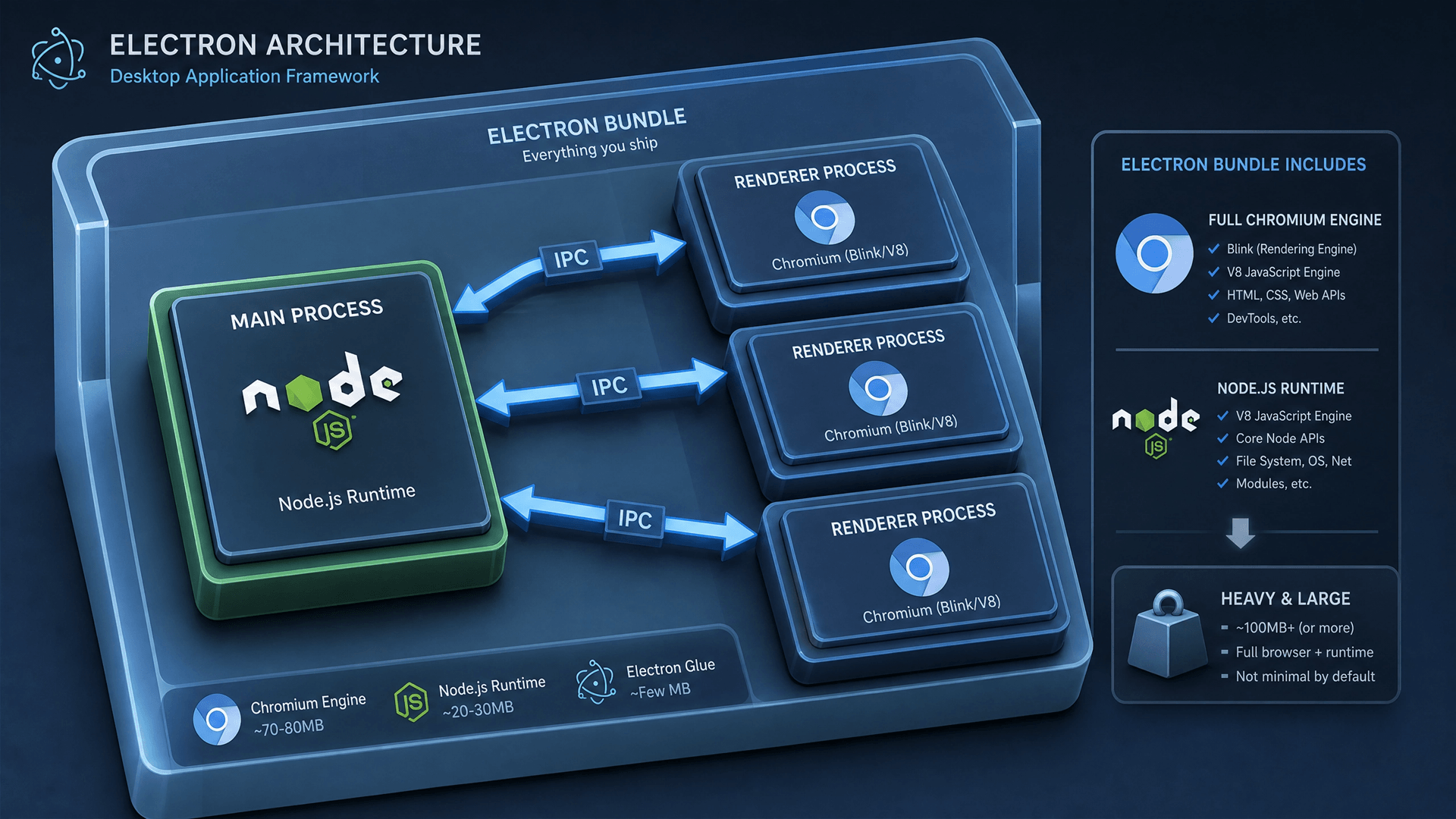
How Electron works
Electron uses a multi-process model. Every Electron app has:
- One main process running Node.js — handles the application lifecycle, creates windows, accesses the filesystem, fires native dialogs.
- One or more renderer processes, each one a complete, isolated copy of the Chromium browser — runs your HTML, CSS, and JavaScript.
The frontend can't directly access the filesystem or the OS. Instead, the main process and renderers communicate through IPC channels — ipcMain.handle() on the backend side, ipcRenderer.invoke() on the frontend side. Messages cross between processes, get serialized, and come back.
Here's the architectural picture:
┌──────────────────────────────────────────────────┐
│  Your App (React / Vue / Angular)                │
│  HTML · CSS · TypeScript                         │
└──────────────────────────────────────────────────┘
┌──────────────────────────────────────────────────┐
│  Chromium Engine — full browser, ~150 MB         │
│  Shipped with every app                          │
└──────────────────────────────────────────────────┘
┌──────────────────────────────────────────────────┐
│  Node.js Runtime — ~45 MB                        │
│  Also bundled per-app                            │
└──────────────────────────────────────────────────┘
┌──────────────────────────────────────────────────┐
│  IPC Bridge (main ↔ renderer)                    │
└──────────────────────────────────────────────────┘
┌──────────────────────────────────────────────────┐
│  OS Abstraction Layer                            │
│  Windows · macOS · Linux                         │
└──────────────────────────────────────────────────┘Why Electron is heavy
The phrase "ships its own Chromium" is the key. Every Electron app you install includes a full copy of the Chromium browser engine — about 150MB on disk. Plus the Node.js runtime, another 45MB. None of it is shared with your OS or with other Electron apps.
And here's the part most people don't realize: every window in an Electron app spawns a new Chromium process. Open a second window in Slack and you've just allocated another ~150MB of Chromium. There's no memory sharing between windows. This is why your Electron apps eat so much RAM when you have several open.
The numbers
- Bundle size: 150–250 MB
- RAM at startup: 150–500 MB (more per window)
- Cold start: 2–5 seconds
- Backend language: JavaScript
When Electron is the right choice
There's a real argument for Electron even in 2026:
- Your team is 100% JavaScript and you have zero appetite for learning a backend language.
- You need maximum browser API compatibility — every web API, every Chromium quirk, exactly the same on every OS.
- You're building something where 200MB of binary is genuinely fine (large enterprise tools, internal apps with no install constraints).
But for everything else, Electron's weight has become a real problem — especially as users have gotten more sensitive to bloated apps, slow startups, and excessive RAM usage on their laptops.
This is the gap that Tauri set out to close.
2. Tauri — lightweight, but Rust has a cost
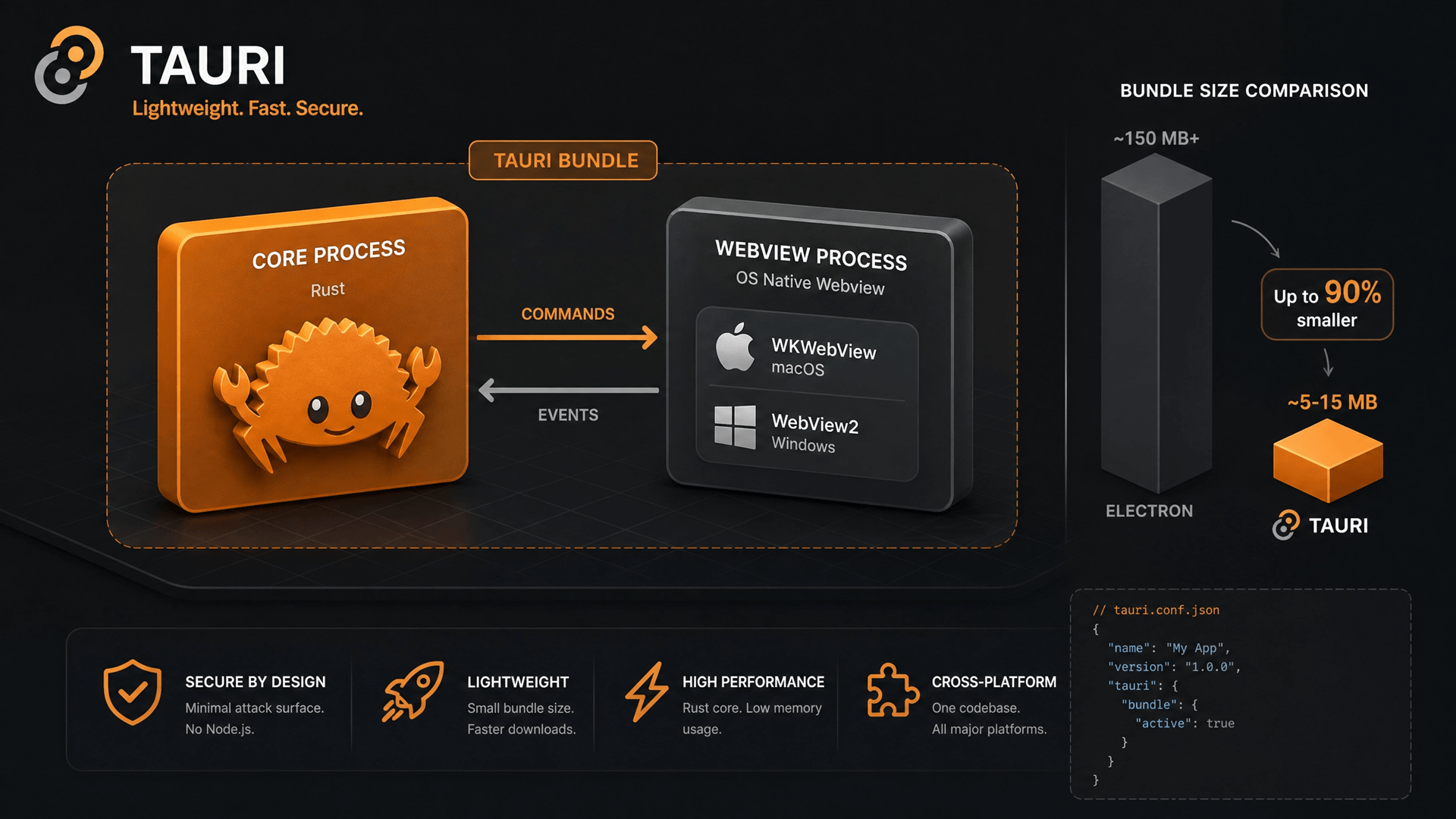
Tauri was a real leap forward when it appeared. It looked at Electron's architecture and asked one obvious question: why are we shipping our own browser engine when every modern OS already has one built in?
macOS has WebKit, accessible through WKWebView. Windows has WebView2 (Microsoft Edge's engine, built on Chromium). Linux has WebKit via GTK. All three are kept patched and updated by the OS. So why bundle Chromium at all?
Tauri's answer: don't.
How Tauri works
Tauri uses the OS-provided WebView to render your frontend, and a Rust backend to handle native code. The two communicate through a JSON-based IPC layer.
┌──────────────────────────────────────────────────┐
│  Your Frontend (React / Svelte / Vue)            │
│  HTML · CSS · TypeScript                         │
└──────────────────────────────────────────────────┘
                       ↓
┌──────────────────────────────────────────────────┐
│  System WebView — OS provided, not bundled       │
│  WKWebView · WebView2 · GTK WebKit               │
└──────────────────────────────────────────────────┘
                       ↓
┌──────────────────────────────────────────────────┐
│  JSON IPC Bridge                                 │
│  Every call: serialize → cross → deserialize     │
└──────────────────────────────────────────────────┘
                       ↓
┌──────────────────────────────────────────────────┐
│  Tauri Core — Rust                               │
│  #[tauri::command] handlers · Tokio async        │
└──────────────────────────────────────────────────┘
                       ↓
┌──────────────────────────────────────────────────┐
│  OS Native APIs                                  │
└──────────────────────────────────────────────────┘What Tauri got right
The bundle size win is enormous. By dropping Chromium and Node.js, Tauri apps typically ship at 5–15MB instead of 150–250MB. RAM usage drops by an order of magnitude. Cold start goes from "noticeable" to "instant."
Rust as a backend language is also genuinely fast at runtime. Memory-safe. No garbage collector. The Tauri team built a thoughtful security model around it — capabilities, allowlists, fine-grained permissions for what the frontend can ask the backend to do.
For a certain kind of project — a small focused tool, a CLI companion app, something where every megabyte matters — Tauri is excellent.
The two friction points
But Tauri has two problems that bite real teams shipping real products.
Problem 1: The JSON IPC bridge adds overhead.
Every time your frontend calls a Tauri backend command, the arguments get serialized to JSON, crossed over the WebView ↔ Rust boundary, deserialized on the other side, processed, then the result gets serialized back. For a click handler that fires once a minute, this is invisible. For a UI that needs to stream rows from a database, or process a folder of files, or update in real-time as the user drags a slider, those allocations add up. You start hitting noticeable latency, and the optimization techniques (batching, custom protocols, sidecars) add complexity that defeats the purpose of picking a "simple" framework.
Problem 2: Rust is hard.
This is the one that doesn't get talked about enough. Rust is a powerful language, but it has a notoriously steep learning curve. The ownership model, lifetimes, the borrow checker — these are real obstacles for teams coming from JavaScript, Python, or even Go. A senior JavaScript developer can be productive in another high-level language in days. Rust takes weeks to months before you stop fighting the compiler.
For a small team or solo developer, this matters enormously. Every Rust-side feature takes longer to build than the equivalent in a friendlier language. Hiring is harder. Code reviews are slower. The library ecosystem, while excellent, is smaller than Go's or Node's.
The numbers
- Bundle size: 5–15 MB
- RAM at startup: 30–100 MB
- Cold start: 0.5–1 second
- Backend language: Rust
When Tauri is the right choice
- Your team already writes Rust, or has the time and appetite to learn it deeply.
- You're shipping a tiny, focused utility where the bundle size is the headline feature.
- You need Tauri-specific features like its capability-based security model.
But if you want the bundle-size win without committing to Rust, the next framework is the answer.
3. Wails — Go-powered, simple, and fast
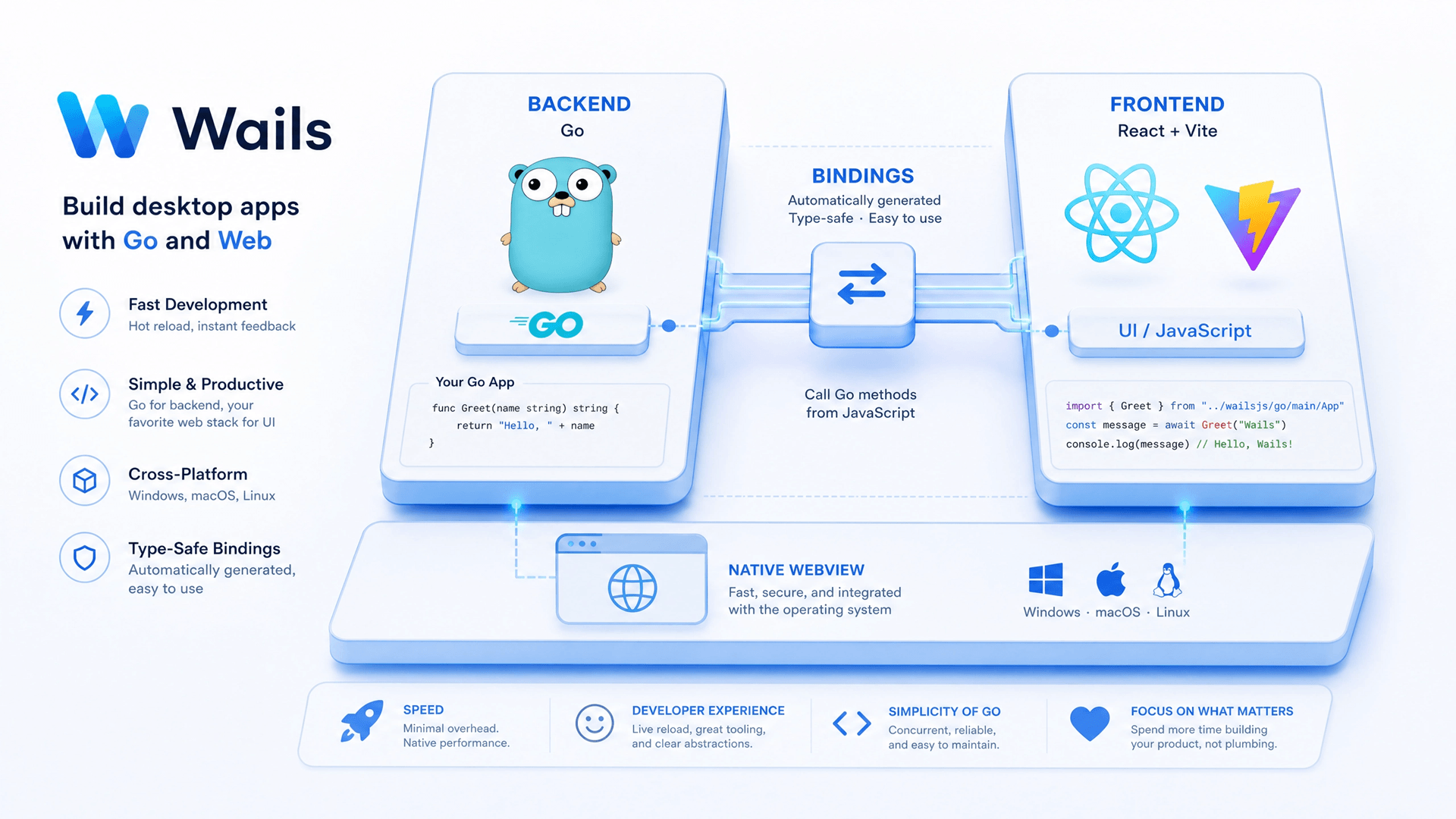
Wails takes Tauri's core architectural insight — use the OS WebView, don't ship Chromium — and pairs it with Go instead of Rust. That single change makes an enormous difference in developer experience, and Wails goes further: it eliminates the JSON IPC bridge entirely.
How Wails works
┌──────────────────────────────────────────────────┐
│  Frontend — React + Vite                         │
│  TanStack Router · TanStack Query · Tailwind     │
└──────────────────────────────────────────────────┘
                       ↓
┌──────────────────────────────────────────────────┐
│  System WebView — OS provided, not bundled       │
│  WKWebView · WebView2 · GTK WebKit               │
└──────────────────────────────────────────────────┘
                       ↓
┌──────────────────────────────────────────────────┐
│  Direct Go Method Binding ⚡                      │
│  Zero JSON serialization                         │
│  Native function calls, not IPC marshalling      │
└──────────────────────────────────────────────────┘
                       ↓
┌──────────────────────────────────────────────────┐
│  Go Binary                                       │
│  Compiled single executable                      │
└──────────────────────────────────────────────────┘
                       ↓
┌──────────────────────────────────────────────────┐
│  OS Native APIs                                  │
└──────────────────────────────────────────────────┘What changes versus Tauri
Go instead of Rust. Go is one of the simplest serious programming languages in widespread use. Static types, garbage collected, no ownership model to fight, compiles in seconds, single-binary deploys. A JavaScript developer can be productive in Go in days, not months. The standard library is excellent and the concurrency model (goroutines, channels) is famously easy to reason about.
Direct method binding instead of JSON IPC. This is the Wails technical superpower. At build time, Wails inspects your Go structs and generates JavaScript bindings for every exposed method. When your React code calls App.GetUsers(), it's a native function call into Go — no JSON, no serialization, no IPC marshalling. You get type safety on both sides, and the call latency drops to near zero.
The result: bundle size as small as Tauri, RAM usage often lower, and a developer experience that's dramatically friendlier.
Where Wails leaves you hanging
Wails is fantastic, but it gives you a clean slate. You still have to:
- Set up your own authentication system (JWT, sessions, OAuth, 2FA)
- Build CRUD endpoints from scratch
- Choose and wire up an ORM
- Set up a database browser for development
- Configure your frontend routing, state management, and UI library
- Generate TypeScript types for your API
For a project that needs auth, user management, and a real database — which is most projects — that's easily a week of plumbing before you can write your first real feature. This is the gap that Grit Framework closes.
The numbers
- Bundle size: 5–15 MB
- RAM at startup: 25–80 MB
- Cold start: < 0.5 seconds
- Backend language: Go
When Wails alone is the right choice
- You want maximum control and prefer to wire up every piece yourself.
- Your app has unusual architectural requirements that don't fit a scaffolded template.
- You enjoy the "blank canvas" experience and have time for the setup work.
For everyone else — which honestly is most teams — Grit takes Wails and turns it into something genuinely production-ready from day one.
4. Grit Framework — the best of all worlds
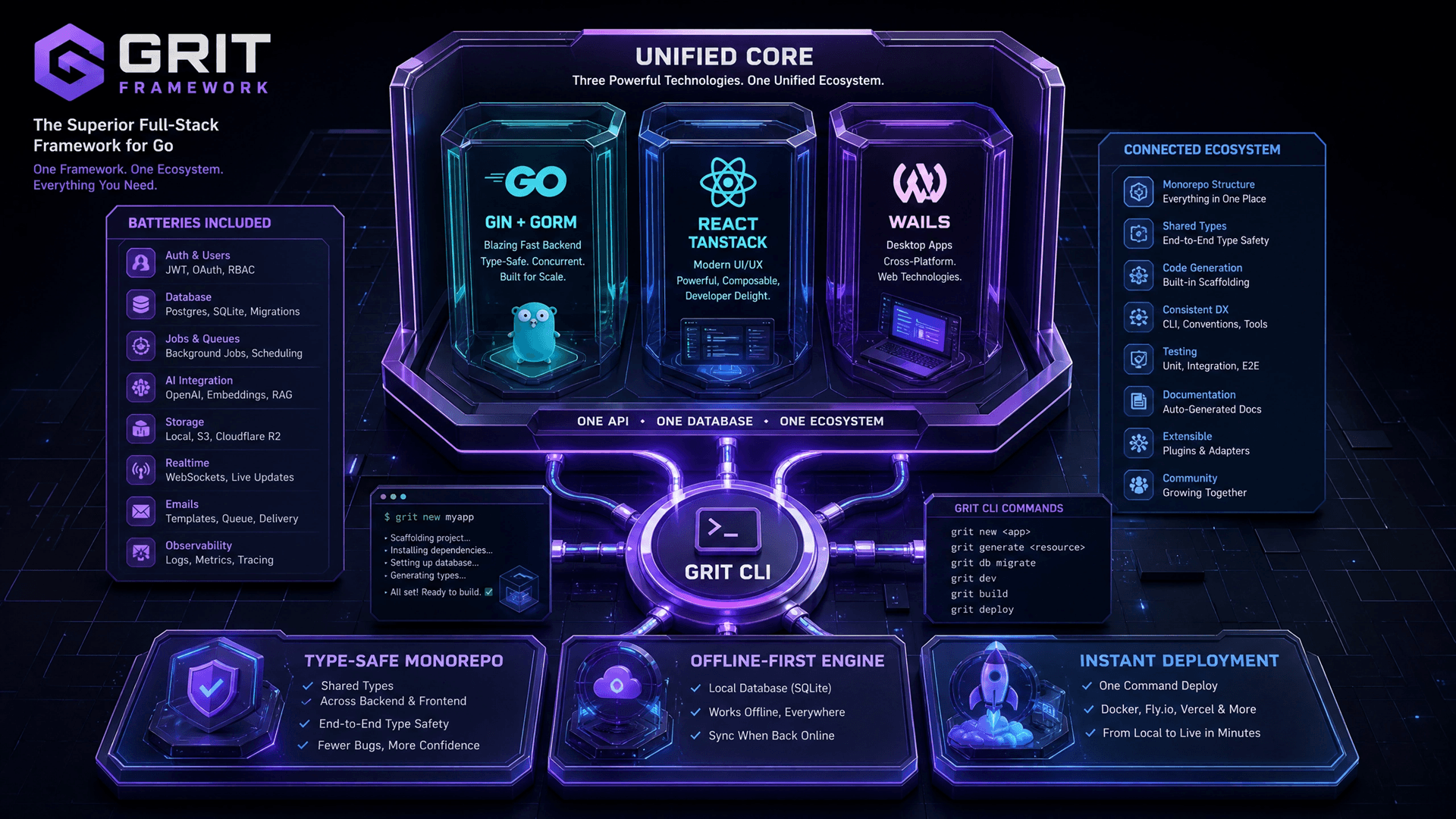
Grit Framework is a full-stack meta-framework built on top of Wails (for desktop) and the broader Go + React ecosystem. It takes Wails' architectural advantages and pre-builds everything you'd otherwise spend a week wiring up.
One command — grit new-desktop myapp — gives you a complete production-ready desktop app scaffold. Not a "hello world" template. A real app with auth, CRUD, an ORM, a visual database browser, type-safe React hooks, and a sensible project structure.
How Grit works
┌──────────────────────────────────────────────────────┐
│  Frontend — React + Vite                             │
│  • TanStack Router (file-based routing)              │
│  • TanStack Query (server state)                     │
│  • Tailwind + shadcn/ui                              │
│  • Auto-generated typed hooks for every Go method    │
└──────────────────────────────────────────────────────┘
                          ↓
┌──────────────────────────────────────────────────────┐
│  System WebView (OS-provided)                        │
└──────────────────────────────────────────────────────┘
                          ↓
┌──────────────────────────────────────────────────────┐
│  Direct Go Method Binding ⚡                          │
└──────────────────────────────────────────────────────┘
                          ↓
┌──────────────────────────────────────────────────────┐
│  Go Binary — batteries included                      │
│  • Auth: JWT · OAuth (Google/GitHub) · 2FA · RBAC    │
│  • Gin handlers + service layer                      │
│  • CRUD resource generator (one command)             │
│  • Activity log + hash chain                         │
│  • Feature flags + A/B testing                       │
│  • Background jobs + cron                            │
│  • PDF + CSV/Excel export                            │
└──────────────────────────────────────────────────────┘
                          ↓
┌──────────────────────────────────────────────────────┐
│  GORM ORM + SQLite                                   │
│  • Type-safe queries · migrations · relations        │
│  • GORM Studio — visual DB browser at /studio        │
│  • Offline-first by default                          │
└──────────────────────────────────────────────────────┘
                          ↓
┌──────────────────────────────────────────────────────┐
│  OS Native APIs                                      │
└──────────────────────────────────────────────────────┘What you actually get
When you run grit new-desktop myapp, the scaffolded project includes:
main.go— Wails entry point, fully configuredapp.go— App struct with bound methods exposed to the frontendinternal/db/db.go— GORM database setup with SQLiteinternal/models/— Pre-built User, Blog, and Contact models with AutoMigrateinternal/services/— Authentication service, CRUD servicesinternal/types/— Shared request/response typesfrontend/src/routes/— File-based routing with TanStack Routerfrontend/src/hooks/— TanStack Query hooks for every backend methodfrontend/src/components/— Reusable UI componentscmd/studio/— GORM Studio standalone server
Two commands and you're shipping:
$ grit new-desktop myapp
$ cd myapp && wails devThe window opens. Hot reload works for both Go and React. Authentication works. The dashboard loads. The CRUD pages work. You can register a user, log in, and see the database visually with grit studio.
The CRUD generator
This is where Grit really shines for productivity. Need a new resource? One command:
$ grit gen resource ProductYou get a Go model, AutoMigrate config, service layer, exposed methods, TypeScript types, and React Query hooks — all wired up. The kind of work that takes hours in most frameworks takes seconds in Grit.
Real apps shipping on this stack
Two production examples I've shipped with this exact architecture:
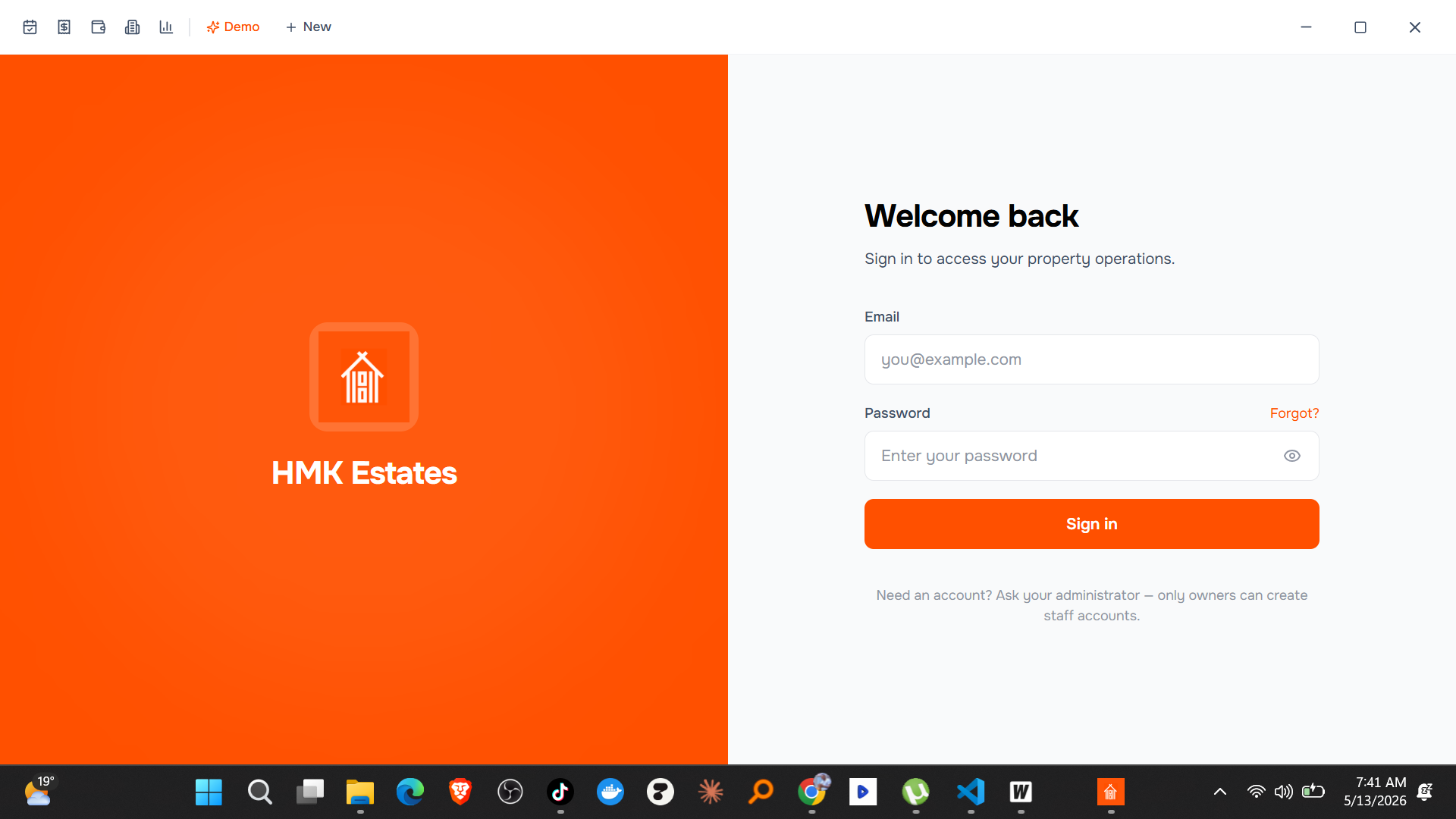
Rental Manager — multi-client SaaS for HMK Estates (a Ugandan property operator). One Go backend powers a Next.js web app, a Wails desktop app, and an Expo iOS / Android app. See the full case study.
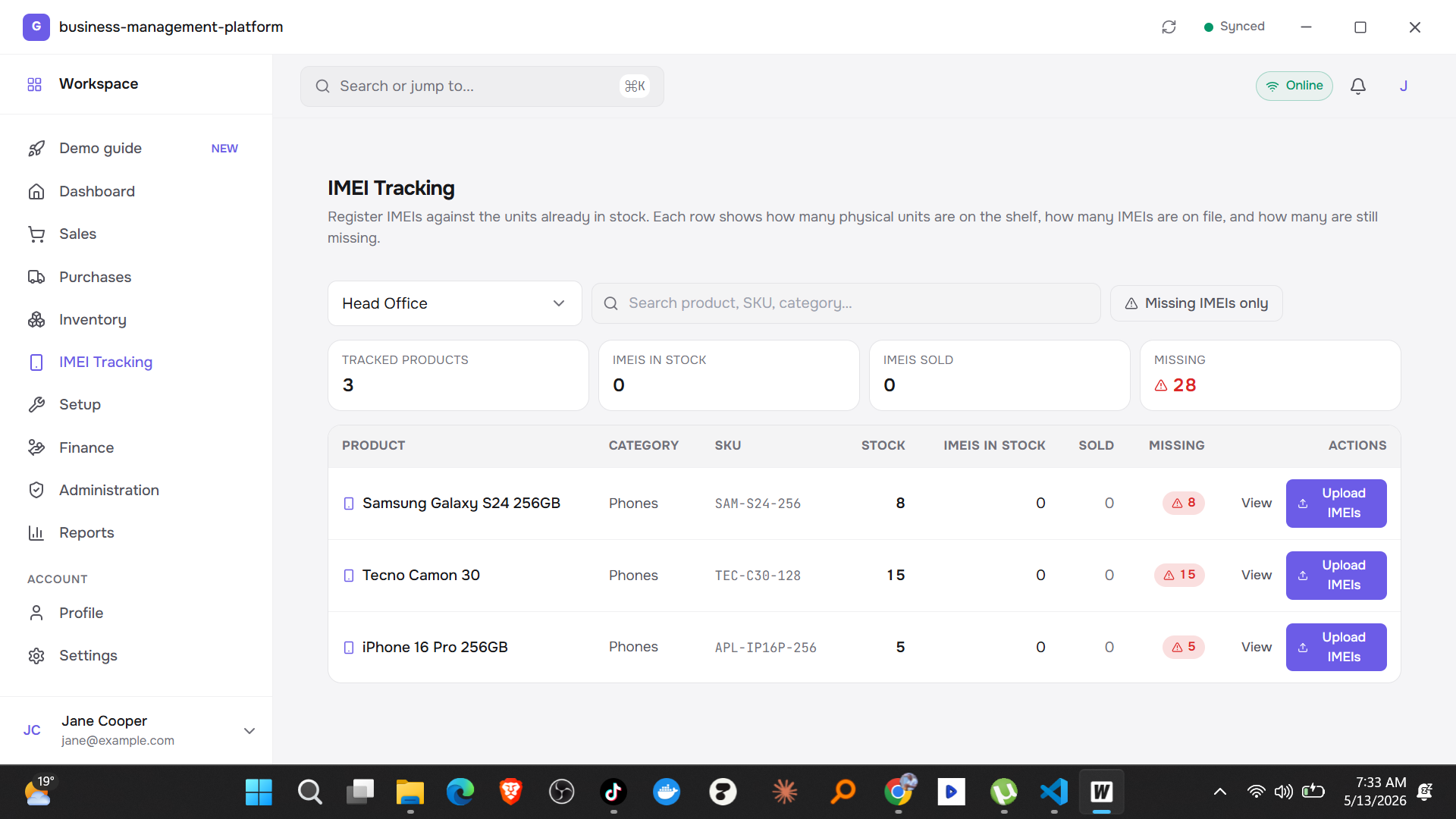
BMS IMEI Tracking Dashboard — internal fleet-management desktop app with offline-first SQLite, JWT auth, and a real-time tracking dashboard. The whole thing scaffolded in one command and shipped to client devices in a single ~10MB binary.
The numbers
- Bundle size: 5–10 MB
- RAM at startup: 20–50 MB
- Cold start: < 0.5 seconds
- Backend language: Go
- Time-to-first-real-feature: minutes, not days
When Grit is the right choice
Honestly? Almost every desktop app project benefits from Grit:
- You want the smallest possible bundle and fastest startup.
- You want a backend language that's simple to learn and pleasant to write.
- You want auth, CRUD, ORM, and a DB browser already wired up.
- You want to grow into multi-client (web, mobile, desktop) without changing frameworks.
- You want to ship in a weekend, not a month.
The only reason not to pick Grit is if you have a hard constraint that rules out Go (your team is locked into another backend stack) or if your project is so unusual that a scaffolded template would get in your way more than it helps.
The side-by-side comparison
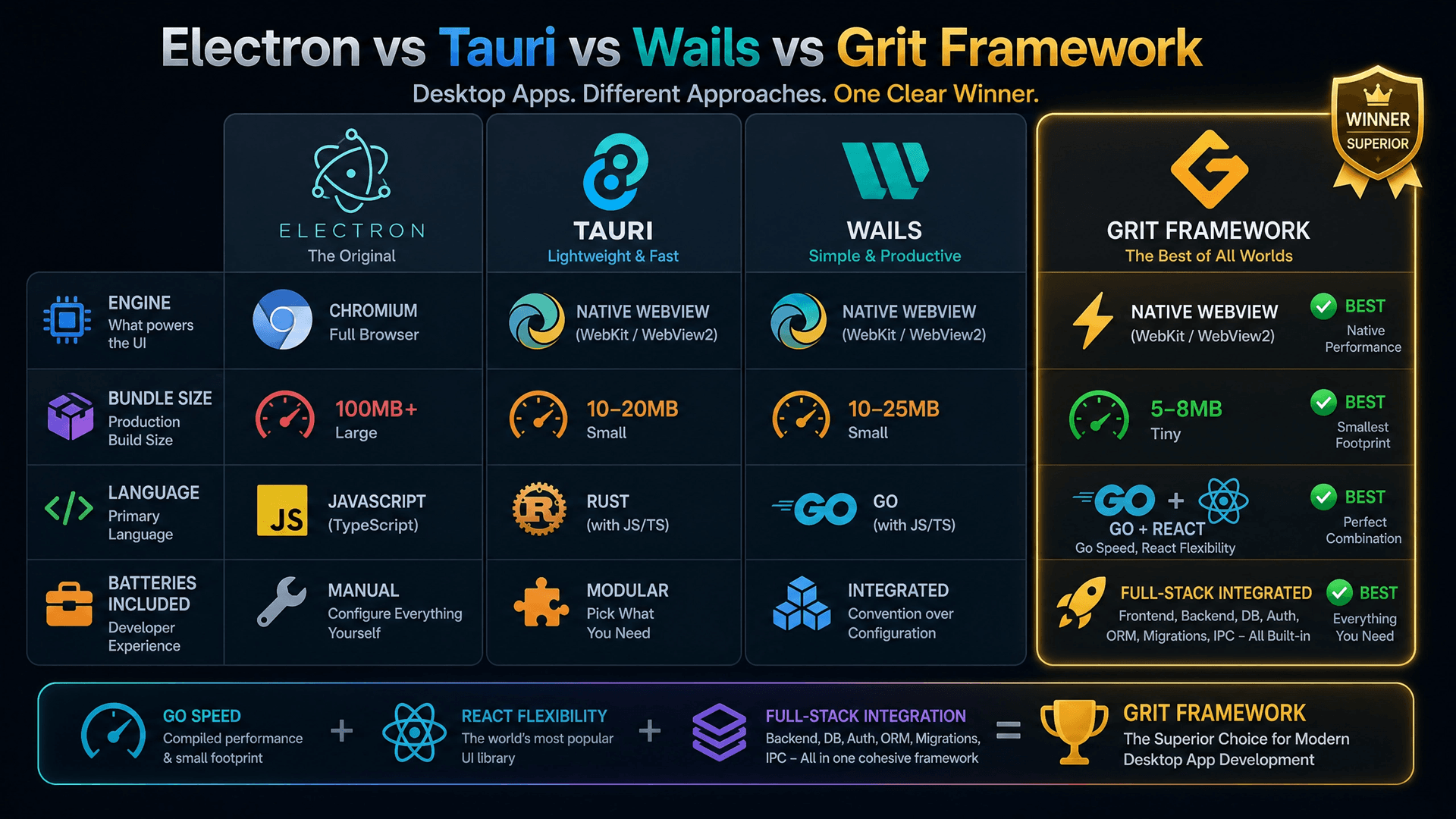
Here's everything in one table:
| Dimension | Electron | Tauri | Wails | Grit Framework |
|---|---|---|---|---|
| Engine | Chromium (bundled) | OS WebView | OS WebView | OS WebView |
| Bundle size | 150–250 MB | 5–15 MB | 5–15 MB | 5–10 MB |
| RAM at startup | 150–500 MB | 30–100 MB | 25–80 MB | 20–50 MB |
| Cold start | 2–5 s | 0.5–1 s | < 0.5 s | < 0.5 s |
| Backend language | JavaScript | Rust | Go | Go |
| Frontend | Any | Any | Any | React + TanStack (pre-wired) |
| IPC overhead | Process-level | JSON serialization | Direct binding | Direct binding |
| Auth included | No | No | No | Yes (JWT + OAuth + 2FA + RBAC) |
| ORM included | No | No | No | Yes (GORM + SQLite) |
| DB browser | No | No | No | Yes (GORM Studio) |
| CRUD generator | No | No | No | Yes |
| Single-binary deploy | No (bundles) | Yes | Yes | Yes |
| Learning curve | Low (if you know JS) | High (Rust) | Low (Go is simple) | Low (Go + conventions) |
How each generation evolved
Reading the table left to right tells a story:
- Electron wrapped a full Chromium per window — universal, but huge.
- Tauri dropped Chromium for the OS WebView — but added JSON IPC overhead and Rust complexity.
- Wails kept the OS WebView, swapped Rust for Go, and replaced JSON IPC with direct method binding — but left you to wire up auth, CRUD, and the database yourself.
- Grit Framework took everything Wails got right and pre-built every battery — turning a clean slate into a production-ready app in one command.
So which one should you pick?
If you read this whole article you can probably guess my answer, but here it is explicitly:
For 95% of desktop app projects in 2026, Grit Framework is the right choice. You get the smallest bundle, the fastest startup, a backend language that's actually pleasant to write, and a fully wired-up scaffold that saves you a week of setup work on day one.
The exceptions:
- Pick Electron if your team is 100% JavaScript with zero appetite to learn anything else, and bundle size genuinely doesn't matter for your audience.
- Pick raw Tauri if your team already writes Rust and you need the specific capability-based security model.
- Pick raw Wails if you have unusual architectural requirements that don't fit a scaffolded template, or you specifically want to wire everything from scratch.
For everyone else — startups, indie developers, solo founders, internal tooling teams, anyone shipping a real product — Grit is the obvious choice. The same architectural advantages, none of the setup overhead.
Try it yourself
The fastest way to feel the difference is to scaffold a project and watch it run:
# Install prerequisites
$ go install github.com/wailsapp/wails/v2/cmd/wails@latest

# Scaffold a complete desktop app
$ grit new-desktop myapp

# Start it
$ cd myapp
$ wails devIn under five minutes you'll have a desktop window running with authentication, a dashboard, CRUD pages, hot reload for both Go and React, and a visual database browser one command away. That's the entire point of Grit — to compress that first week of plumbing into the first five minutes.
Frequently asked questions
What is the lightest desktop app framework in 2026?
The Grit Framework produces the smallest binaries (5–10 MB) because it uses the OS-provided WebView (no bundled Chromium), compiles to a single Go binary, and has no JSON IPC marshalling overhead. Tauri and Wails are close behind at 5–15 MB. Electron is dramatically larger at 150–250 MB because it bundles its own Chromium and Node.js with every app.
Should I use Electron or Tauri in 2026?
For a brand-new project, neither is the default choice anymore. Electron is too heavy unless you have a strict JavaScript-only constraint and binary size doesn't matter. Tauri is a real improvement on Electron, but you pay for it with Rust's steep learning curve and the JSON IPC overhead on every backend call. Most teams should pick Wails or Grit Framework for the same bundle-size win without the Rust friction.
Is Wails better than Tauri?
For most teams, yes. Wails matches Tauri's bundle-size and RAM advantages while swapping Rust for Go (a vastly friendlier language to learn and ship in) and replacing the JSON IPC bridge with direct method binding (zero serialization overhead, type-safe on both sides). The downside is that Wails leaves you with a clean slate — you still wire up auth, CRUD, and the database yourself. That gap is exactly what the Grit Framework closes.
What is the Grit Framework?
Grit is a full-stack meta-framework built on top of Wails (for desktop), Gin + GORM (for the Go backend), and React + TanStack (for the frontend). It pre-scaffolds everything you'd normally spend a week wiring up — JWT auth, OAuth, 2FA, RBAC, CRUD endpoints, GORM ORM, a visual database browser, background jobs, PDF/CSV export — and exposes a CRUD generator (grit gen resource Product) that wires up Go, TypeScript types, and React Query hooks in one command. I built it because I was tired of repeating that setup work on every new project.
Can the same codebase run as web, desktop, and mobile?
Yes — that's the multi-client architecture mode of Grit. One Go backend, one shared schema package, with separate Next.js (web), Wails (desktop) and Expo (iOS/Android) clients all talking to the same API. I shipped exactly this for HMK Estates' Rental Manager — read the full case study for the architecture details.
Which framework should a solo developer pick to ship fast?
Grit Framework. A solo developer's most valuable resource is time, and Grit compresses the first week of plumbing (auth, ORM, DB, project structure) into the first five minutes. That's the single biggest practical difference between any of these four frameworks for a one-person team.
Need help shipping a desktop app?
I build production multi-client SaaS systems with Wails and the Grit Framework — desktop, web, iOS and Android off a single Go backend. Already shipped to property operators, fleet trackers, and internal-tools teams.
- 📞 Book a session — 1-on-1 mentorship, code review, weekend intensive, or full project consult. Sessions from UGX 50,000.
- 💼 Hire Desishub for custom desktop or multi-client SaaS builds — desishub.com
- 📺 YouTube — practical Go, Next.js, and desktop app tutorials at @JBWEBDEVELOPER
Resources
- Grit Framework website: gritframework.dev
- Desktop documentation: gritframework.dev/docs/desktop/getting-started
- Stack Selector (pick the right Grit combo): gritframework.dev/docs/stack-selector
- GitHub: github.com/MUKE-coder/grit
- Wails: wails.io
- Tauri: tauri.app
- Electron: electronjs.org
If this article saved you a weekend of evaluating frameworks, share it with someone else who's about to start a desktop app project. And if you want to see Grit in action, check out the 17-minute video walkthrough on YouTube where I build a complete desktop app from scratch using each of these four frameworks.